.png)
When your cargo charter platform handles time-critical shipments worth millions, the cloud infrastructure behind it cannot afford to go down. That's why understanding every AWS service level agreement matters, not just as a legal formality, but as a foundation for operational reliability. At CharterSync, our digital air cargo charter platform runs on cloud services that must stay available around the clock, because freight forwarders and logistics managers depend on real-time quoting, tracking, and booking without interruption.
An AWS SLA defines the uptime commitments Amazon Web Services makes for each of its products, along with the service credits you can claim if those commitments aren't met. For any business building on AWS, whether you're running a logistics platform like ours or managing supply chain data pipelines, knowing these terms inside out helps you plan for resilience and hold your providers accountable.
This guide breaks down how AWS SLAs work, what uptime guarantees apply to key services, how the service credit process operates, and what the legal terms actually mean in practice. By the end, you'll have a clear picture of what AWS promises, what it doesn't, and how to use that knowledge when architecting reliable systems.
Every business that builds on AWS is implicitly making a bet on uptime. When you rely on cloud infrastructure for customer-facing applications, a service outage isn't just inconvenient; it directly translates into lost revenue, damaged trust, and operational paralysis. Understanding each AWS service level agreement gives you a factual basis for designing systems that can absorb disruption and meet your own customers' expectations.
For logistics and supply chain teams, availability is not optional. A freight forwarder trying to book an urgent cargo charter at 2am cannot wait for a database service to recover. Unplanned downtime erodes confidence fast, and without knowing the exact uptime guarantee your cloud provider commits to, you cannot accurately quantify that risk.
AWS SLAs do not eliminate the possibility of downtime; they define what compensation you receive when it happens and what standard AWS is contractually held to.
Your business continuity planning depends on real numbers, not assumptions. If AWS EC2 commits to 99.99% monthly uptime, you can calculate the maximum permissible downtime per month (roughly 4.4 minutes) and decide whether that figure matches the tolerance your operations can absorb.
AWS SLAs directly influence how you architect redundancy. If a single-region deployment falls below the uptime threshold you need, the SLA terms signal that you should consider multi-region or multi-AZ configurations rather than treating single-service guarantees as sufficient on their own.
Reading the fine print also tells you what AWS explicitly excludes from its commitments. Force majeure events, customer-side configuration errors, and third-party service failures typically sit outside the scope of any SLA. Knowing these boundaries upfront means you design for real-world conditions rather than best-case scenarios, which is the only approach that holds up under operational pressure.
AWS does not publish a single blanket agreement for all its products. Instead, each service carries its own aws service level agreement, with distinct uptime commitments and exclusion clauses. Amazon EC2 targets 99.99% monthly uptime, while Amazon S3 commits to 99.9%. These differences exist because each service has a different infrastructure profile and usage pattern.

The variation across services matters when you build a multi-service stack. A chain of three services each carrying a 99.9% uptime commitment faces compounded availability risk, pushing combined availability toward 99.7%, which equates to roughly 21 hours of potential downtime per year.
Treat each service SLA as an individual data point, not a collective guarantee for your entire architecture.
Some common reference points:
AWS SLAs apply per region, and not every region offers identical service commitments. Deploying across multiple Availability Zones gives you access to higher availability tiers that AWS ties to specific architectural patterns.
Running in a single AZ typically reduces your redundancy level and may disqualify your deployment from the highest uptime tier a given service offers. You should confirm which deployment configuration qualifies for each SLA before you finalise your architecture.
AWS publishes each aws service level agreement as a formal legal document, and the language can obscure critical conditions if you skim it. Before relying on any uptime figure, you need to understand the specific definitions AWS uses, because terms like "monthly uptime percentage" have a precise calculation method that differs from common assumptions.
The exclusions section tells you what AWS will not count as a service failure. Scheduled maintenance windows, issues caused by your own configuration, and events outside AWS's reasonable control all fall outside the SLA scope. Reading these definitions carefully prevents you from assuming every outage qualifies for a service credit claim.
The definition of "unavailability" in each SLA is specific to that service, so never apply one service's definition to another.
AWS measures uptime monthly, not annually, which means a single bad month can trigger credit eligibility even if your annual average looks strong. You should also confirm the minimum credit threshold, because most SLAs only pay out credits when downtime crosses a defined percentage within that measurement window. Reviewing these thresholds before you build your incident response process saves significant confusion when an actual outage occurs and you need to act quickly.
When AWS falls short of its uptime commitment, it doesn't issue refunds in cash. Instead, it provides service credits applied against your future AWS bill. The credit percentage scales with the severity of the outage, and each aws service level agreement specifies the exact tiers.

Credits compensate you for billing periods where AWS missed its uptime target, but they cap at a defined percentage of your monthly charges for the affected service. Most SLAs cap credits at 10% to 30% of that month's fees depending on how far availability dropped. Credits never exceed what you actually paid, so they represent partial mitigation rather than full compensation.
Service credits are not a substitute for architectural resilience; they are a billing adjustment after the fact.
You must submit a claim proactively through the AWS Support Centre within 30 days of the incident. AWS will not issue credits automatically. When you file, include specific timestamps, the affected service, and your account ID to support the claim.
AWS reviews each claim and confirms credit eligibility based on its own data, so keeping detailed monitoring records strengthens your case significantly.
An AWS service level agreement gives you the floor, not the ceiling. Your service level objectives (SLOs) define the internal targets you commit to your own customers, and those targets need to sit above AWS's baseline commitments to account for application-layer failures, network latency, and your own dependencies.
Your SLOs should always be stricter than the AWS SLAs you rely on, otherwise you have no buffer when AWS operates at the edge of its commitment.
Start by listing every AWS service your platform uses and pulling the confirmed uptime figure from the relevant SLA document. Then calculate compound availability across your critical path to understand the realistic ceiling your architecture can achieve.
For example, if your stack combines EC2 (99.99%), RDS Multi-AZ (99.95%), and S3 (99.9%), your combined theoretical availability is approximately 99.84%, which sets a hard upper boundary for any SLO you publish.
Your infrastructure introduces failure points beyond AWS, including your application code, third-party integrations, and deployment processes. Factor these into your SLO target by setting a realistic buffer below your calculated AWS ceiling. This approach ensures your commitments to customers remain achievable under real-world conditions.
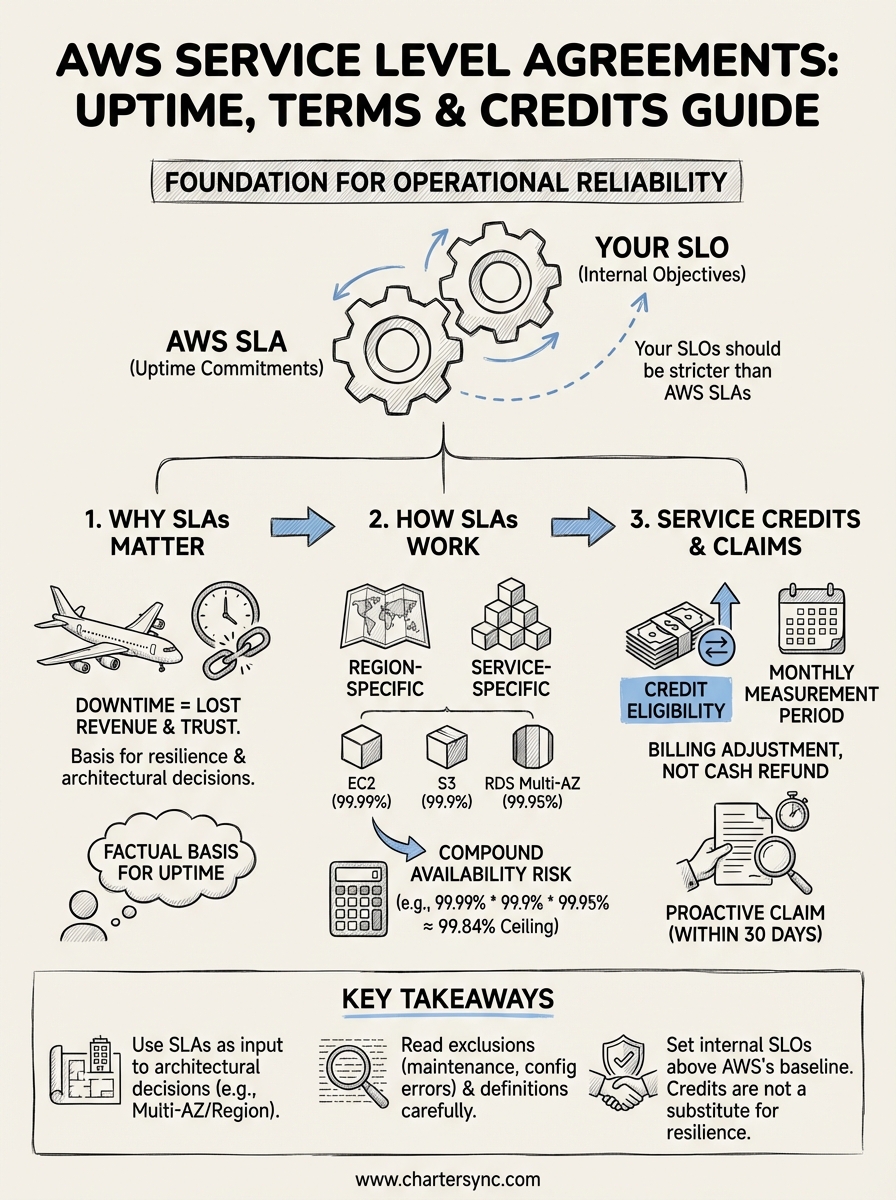
Every aws service level agreement sets a contractual uptime floor for a specific service, not a guarantee across your entire stack. You need to read each SLA individually, calculate compound availability across your critical dependencies, and set internal SLOs that sit above AWS's baseline commitments to leave room for your own failure modes.
Credits exist as a billing adjustment, not a safety net. You must submit claims proactively within 30 days, backed by monitoring data, or you forfeit your eligibility entirely. Treat exclusions seriously, because configuration errors and third-party failures sit outside AWS's responsibility regardless of how severe the outage is.
Building reliable systems means using SLAs as an input to architectural decisions, not as a comfort blanket. Multi-AZ and multi-region designs close the gap between what AWS commits to and what your customers actually need. For time-critical operations that cannot absorb downtime, visit CharterSync to see how a purpose-built platform handles operational reliability at scale.

.png)